How do I archive or delete a customer?
Open the customer, click ⋯ (More actions), then Archive to hide them from the list, or Delete customer… to remove them for good.
Archive a customer you no longer work with: they leave your active list but keep all their history. Delete only a customer added by mistake: it can't be undone. Both are in the ⋯ (More actions) menu on the customer's record.
Also called: remove customer, hide customer, inactive client, past customer, archiver un client, supprimer un client, client inactif, retirer
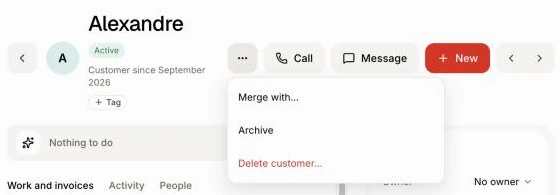
Step 1: Open the customer's menu
Open Customers, click the customer, then click ⋯ at the top right.
Click: Customers › the customer › More actions
Step 2: Archive the customer
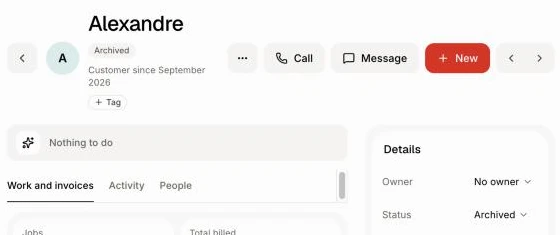
Click Archive. The status becomes Archived and they leave Active customers. Their jobs, quotes, invoices and history stay. To bring them back, open the same menu and click Unarchive.
Click: More actions › Archive
Step 3: Or delete the customer
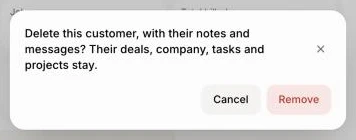
Click Delete customer…. Only that person goes, with their notes and messages: "Delete this customer, with their notes and messages? Their deals, company, tasks and projects stay." Confirm, and you see Customer deleted.
Their deals stay on the board. A deal that had other people on it goes to the next one; a deal they were alone on stays with nobody on it, under its company's name. Add someone to it from the deal's Customers card.
Click: More actions › Delete customer…
Several at once
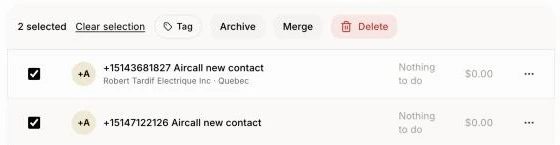
On Customers, tick the customers (on a phone, tap Select first, then tap each customer). In the bar, click Archive or Delete (the red bin on a phone). After archiving, click Undo in the message if you changed your mind. When you delete several, any customer who has jobs, quotes or invoices is kept.
Click: Customers › the boxes › Archive or Delete
Good to know
To see archived customers, pick Status: Archived above the list.
On a computer, each line's ⋯ menu also has Archive and Delete….
A duplicate? Merge it instead, so nothing is lost. See How do I merge duplicate customers?
Ask Alori can archive or delete a customer when you ask. A delete has no Undo.
If it doesn't work
"This customer has jobs, quotes or invoices. Remove those first." Archive them instead, or delete their jobs, quotes and invoices first.
"… kept: delete their jobs, quotes and invoices first." Those customers still have work. Archive them instead.
No ⋯ menu. Your role can view customers but not change them.