How do I change my Alori address?
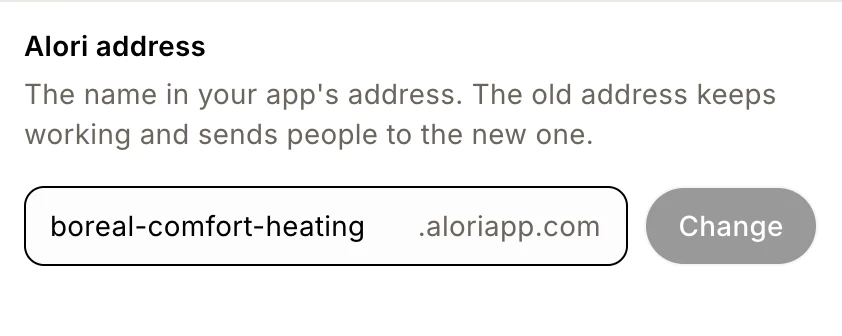
Click the pencil beside your address above the preview, type a new name under Alori address, then click Change. The old address keeps working.
Click the pencil (Change address) beside your address above the preview. Under Alori address, type the new name and click Change. Your app now opens at yourname.aloriapp.com, and the old address keeps working and sends people to the new one.
Also called: subdomain, web address, URL, link, app address, aloriapp.com, alori.dev, adresse, sous-domaine, lien
Your Alori address is free and comes with every app. Your website opens at yourname.aloriapp.com, and your team app at app.yourname.aloriapp.com.
Step 1: Open the address setting
Above the preview, find Live app with your address. Click the pencil beside it (Change address). Project settings opens right at Alori address. You can also click Settings and scroll down to it.
Click: Change address

Step 2: Type the new name and click Change
Type the name you want in the box before .aloriapp.com, like gagnonplumbing. Use 3 to 40 lowercase letters, numbers or single hyphens. Click Change. You'll see Address changed.
Click: Change address › type the name › Change
Good to know
Old links keep working. Anyone who opens your old address is sent to the new one.
Your team app's address changes too. It moves to
app.newname.aloriapp.com, and the old one sends your team there.Addresses moved to aloriapp.com. Apps used to be at
yourname.alori.dev. Every app now opens atyourname.aloriapp.com, and links with the old address still open your app.Your email address changes too. Your app's email address (
yourname@alorimail.com) follows your Alori address. Emails sent to the old one still arrive. See Does my business have its own email address?Not published beside your address means your app isn't live yet. The address goes live when you publish.
Want your own address, like app.yourcompany.com? See How do I connect my own domain?
If it doesn't work
"Use 3 to 40 lowercase letters, numbers or single hyphens." Remove spaces, accents and other signs, and don't use two hyphens in a row.
"This name is reserved. Try another one." Pick another name.
"Another app already uses this name. Try another one." Add your city or trade, like
gagnon-laval."Your app is updating right now. Try again when it's done." Wait for the change or publish to finish, then try again.
"Your app is still being set up. Try again in a minute." Wait a minute, then try again.
"Something went wrong. Try again." Try again in a moment.