How much does a change cost?
A typical change costs about one credit, sometimes a fraction; bigger ones cost more. A failed change that modified nothing is free.
A typical change costs about one credit, sometimes a fraction. A bigger change costs more, because the price follows the work Alori does for it. You see the count go up while Alori works, and the total in the details of its reply.
Also called: price of a change, credits, cost, how many credits, combien ça coûte, crédits, prix d'un changement
Step 1: Watch the count while Alori works
Under the progress, Alori shows what it has used so far, like "1 credit so far". It goes up as Alori works.
Click: nothing, just watch
Step 2: See the total when it's done
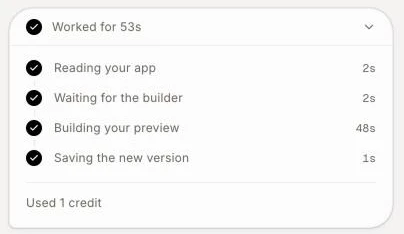
When Alori finishes, click Worked for … above its reply to open the details. The last line shows what it used, for example "Used 1 credit". Answers in Ask and plans in Plan show what they used the same way.
Click: Worked for …
Step 3: Check your balance
Your credits left show at the top of the workspace. To buy more, click Add credits. Credits you buy never expire.
Click: Add credits

Know the cost before a big change
Use Plan for a bigger change. Before you click Execute plan, the plan card shows an estimate, like "About 22 to 39 credits ($6.60 to $11.70)". It's a range, not a price: it depends on how much changes and whether fixes are needed, and you pay what the build actually uses.
What you don't pay for
A failed change. If Alori couldn't make the change and nothing was modified, it gives the credits back.
A stopped change with no work done. You see "Stopped. Nothing was charged." If some work was done, you pay only for that.
Your management app's setup ("Included with every app. Uses no credits.") and your first website.
Other things that use credits
Restoring an earlier version from History and upgrading your app to the newest Alori features use credits, the same as asking for a change in chat.
If it doesn't work
"You're out of credits, so your changes are paused." Nothing new starts at 0 credits. Click Add credits, then send your request again.
"You're out of credits. I paused the work; add credits and I'll pick up where I left off." You ran out in the middle of a change. Add credits and Alori continues.
"You're out of credits, so I didn't make this change and you weren't charged. Add credits to keep going." Add credits, then ask again.