How do I use other currencies?
Pick your main currency in Settings › Your business, add the others you sell in, then choose one on each deal next to its amount.
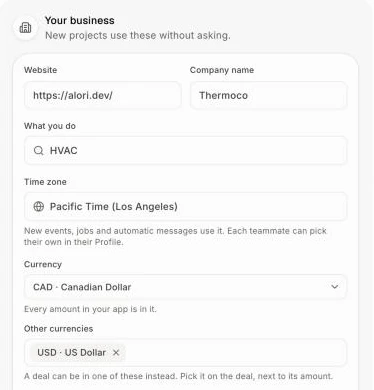
Every amount in your app is in your main currency. To sell in other currencies too, add them in Settings › Your business, then pick one on each deal, right under its amount.
Also called: currency, currencies, US dollars, euros, USD, EUR, CAD, foreign currency, devise, devises, dollars américains
Step 1: Choose your currencies
Click your picture at the top right, then Settings. In Your business, pick your main one under Currency. Under Other currencies, type and pick each one your deals can be in. To take one off, click its ×.
Click: your picture › Settings › Your business › Other currencies
Step 2: Pick a deal's currency
Open the deal. Under its amount at the top right, click the currency (like CAD) and pick another. It saves right away, and the amount, its line items and the deals list all show in that currency.
Click: the deal › the currency under the amount

Good to know
The currency choice only shows on a deal once you have more than one currency.
Totals, like Open value on the deals page, add amounts as they are, without converting them.
You can also ask Alori: "Put the Ko International deal in US dollars" or "Add euros as a currency".