How do booking reminders work?
Each confirmed appointment gets an email to everyone 1 hour before. You can add reminders to the customer: 2 days, 1 day, 4 hours or 1 hour before.
Every confirmed appointment gets an email 1 hour before, to the customer, their guests and you. On top of that, you can send the customer up to 4 reminders: 2 days, 1 day, 4 hours or 1 hour before. A new link starts with 1 day before.
Also called: appointment reminder, reminder email, no-show reminder, booking notification, stop my reminder emails, rappel de rendez-vous, courriel de rappel, rappel automatique
Step 1: Open the link
Got a reminder email? Click Change them here at the bottom. It opens the link's reminders right away.
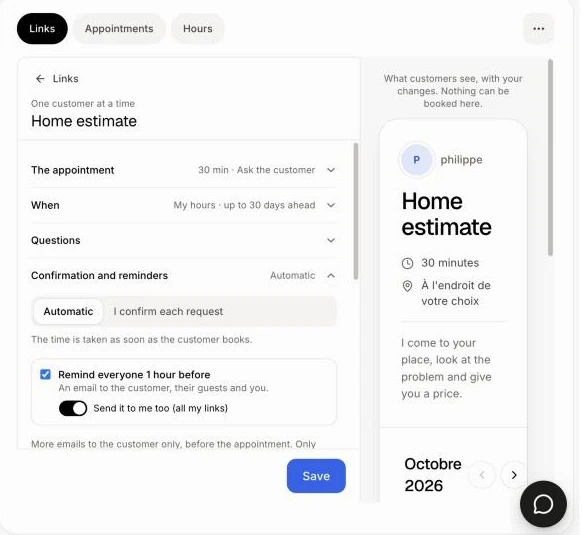
Or in Booking › Links, click the link's name, then Confirmation and reminders.
Click: the link › Confirmation and reminders
Step 2: Choose the reminders
Remind everyone 1 hour before: an email to the customer, their guests and you. Untick it to stop it for everyone on this link.
Send it to me too (all my links): turn it off to stop only your own email, on all your links. The customer still gets theirs. It saves right away.
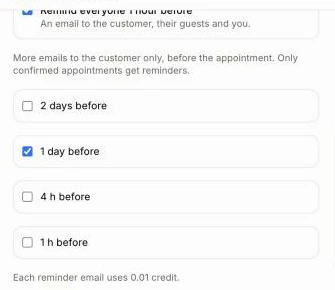
Under it, tick the reminders the customer gets: 2 days before, 1 day before, 4 hours before, 1 hour before.
Step 3: Save
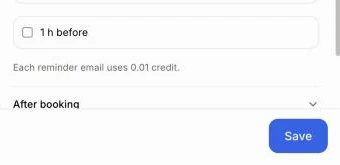
Click Save. The next appointments follow your choice.
Click: Save
Good to know
Only confirmed appointments get reminders. A request you haven't confirmed gets none.
Each reminder email uses 0.01 credit.
A reminder is skipped when the appointment was booked after its time. Booked this morning for this afternoon? The 1-day reminder isn't sent.
When an appointment moves, its reminders start over for the new time.
No email goes out without credits. The appointment still stands.
You can also ask Alori: "stop my reminder emails".
If it doesn't work
A customer got no reminder. Check that the appointment was confirmed, that the reminder is ticked, and that you have credits.
You don't want the 1-hour email. Click Change them here at the bottom of the email, then turn off Send it to me too. The customer still gets reminded.