How do I ask my personal assistant for more while it's busy?
Just write. It keeps working, asks which comes first, and puts the rest on its Up next list to do by itself, one after the other.
You don't have to wait for your personal assistant to finish. Write to it while it works, like you would to a real assistant. It doesn't drop what it's doing: it answers right away and asks what comes first. Anything that has to wait goes on its Up next list, and it starts each one by itself when it's done.
Also called: queue, file d'attente, priority, priorité, en attente, Ensuite, Up next, to-do list
Step 1: Write while it works
Send your message as usual, even while it says Working on it. It keeps working and answers in a few seconds:
Ask how it's going ("Update me") and it tells you.
Ask for something quick, like your next meeting or a customer's phone number, and it answers right away.
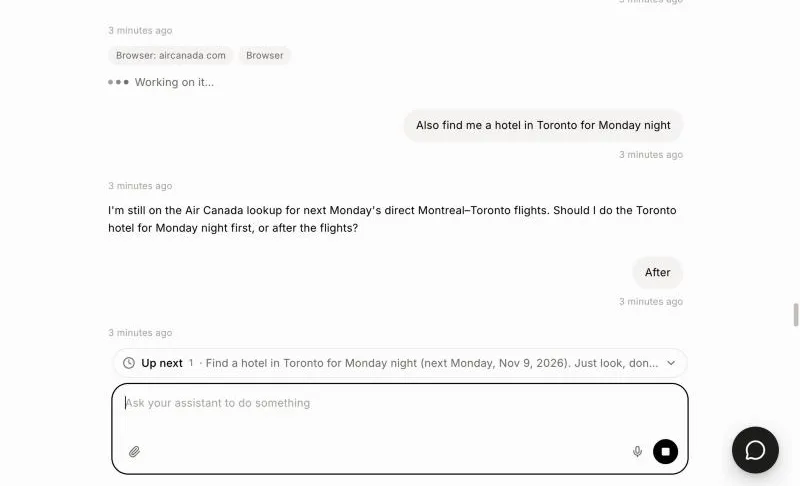
Ask for more work, like booking a flight, and it asks: "I'm still on the event sign-ups. Do the flight first, or after?" Say first and it pauses the current job, does yours, then picks the first one back up. Say after and it keeps going and adds yours to the list.
If it asked you a question about the job it's on, just answer: it picks that job up with your answer.
Click: Bots › Personal assistant › type your message › Send
Step 2: See what's next, or take something off
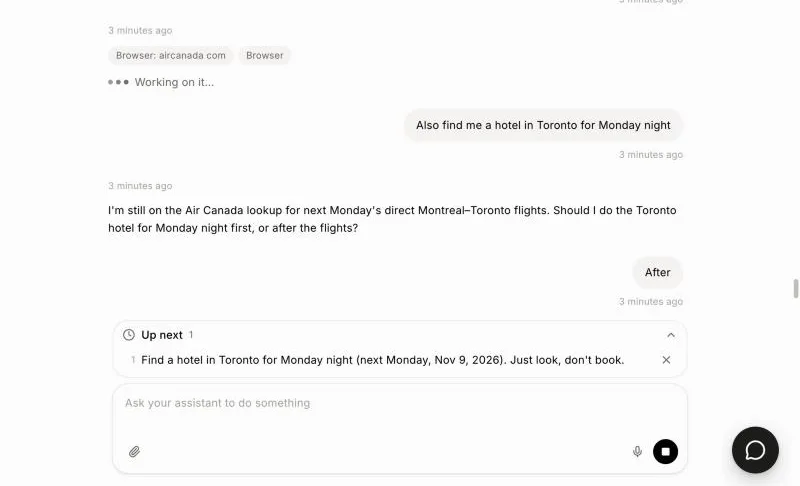
Up next shows above the chat box with how many things are waiting. Click it to see the whole list, in the order it will do them. Click × to take something off the list. It also texts you what it found when your phone PIN is set, since it did that work on its own.
To change the order, just tell it ("do the hotel before the restaurant"). Stop stops everything, and clears the list too.
Click: Up next (above the chat box) › ×
If it doesn't work
It started something on the list too soon, or in the wrong order. Tell it the order you want, or click × on what you don't want.
Nothing on the list starts. It waits while it needs you: a step to approve, a sign-in, or a button to tap. Do that first, and it carries on.
It stopped what it was doing. It stops when you say "stop" or "cancel", or press Stop. Ask again to start over.