How do I connect my Gmail?
Open Connectors, click Connect on Gmail under Just for you, and allow access on Google's screen. Customer emails then leave from your own address. It's private: nobody else on your team is affected.
Open Connectors and click Connect on Gmail, under Just for you. Allow the access Google asks for. Your customer emails then leave from your own Gmail address, and replies still come back to Conversations. Your Gmail is private: connecting it changes nothing for anyone else on your team.
Also called: link Gmail, Google email, connect my email, send from my address, connecter Gmail, lier mon courriel, Google Mail
Step 1: Open Connectors
Click the grid menu at the top right, then Connectors. Gmail is at the top, under Just for you. A teammate who only uses the CRM finds Connectors in their own menu at the top right.
Click: Connectors › Just for you › Gmail
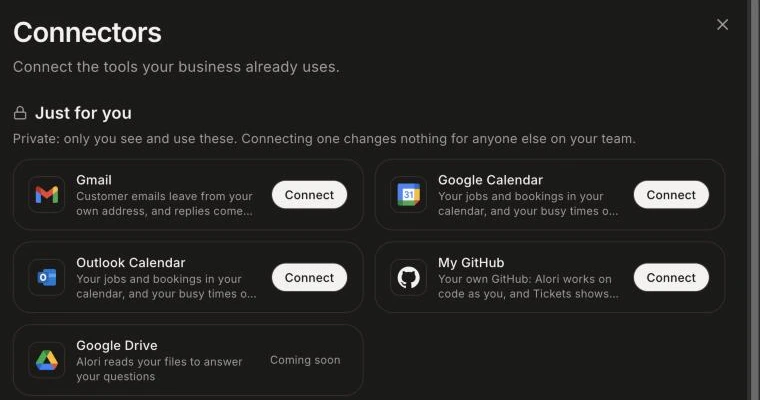
Step 2: Connect Gmail
Click Connect. Google opens: pick your account and allow the access it asks for. You come back to Connectors and see "Gmail is connected."
Click: Gmail › Connect
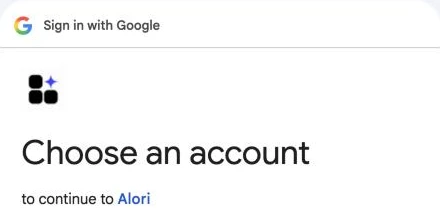
Step 3: Check where emails leave from
Click Manage on Gmail. The switch Send customer emails from my Gmail decides where your emails leave from. Off, they leave from your company's Alori address, and replies still come back to Conversations.
Click: Gmail › Manage › Send customer emails from my Gmail
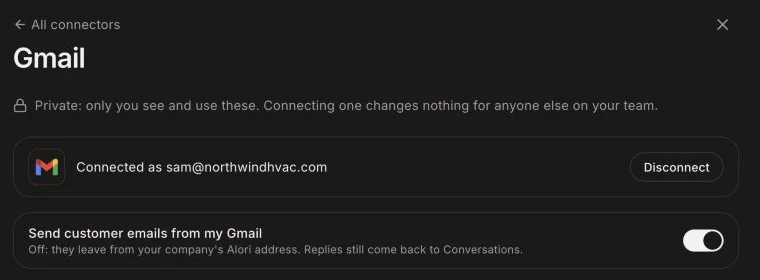
Good to know
It's private. Each person connects their own Google account, and nobody else sees your mailbox.
Only replies to emails sent from Alori, and threads you add to a conversation, reach your team.
Your Email page in the CRM then shows your own Gmail. See How does my personal Email page work?
Emails sent through Gmail use no credits.
To stop, click Manage › Disconnect. Your emails then use Alori's address until you connect again.
If it doesn't work
"Gmail could not connect. Try again." Click Connect again and allow every access Google lists.
Gmail shows "Needs reconnect". Google cut the access, often after a password change. Click Manage › Reconnect. Until then, your emails leave from your company's Alori address.
"Open your CRM once, then come back here to connect your own accounts." Alori doesn't know you in the CRM yet. Open the CRM once, then come back.
"This connector is not configured yet." Gmail isn't available yet. Your emails still go out from your company's Alori address.