How do I create a survey and choose when it's sent?
In Customers › Satisfaction › Surveys, click New survey, then tell Alori when it goes out, like "when a deal moves to Won, send this survey".
Open Customers › Satisfaction › Surveys and click New survey. Give it a name and its own question, then tell Alori in plain words when it goes out. Each "when" is an automation: you see the plan and press Accept before anything is saved.
Also called: customer survey, feedback survey, NPS survey, CSAT, satisfaction survey, sondage de satisfaction, questionnaire client, sondage après un travail
Step 1: Add a survey
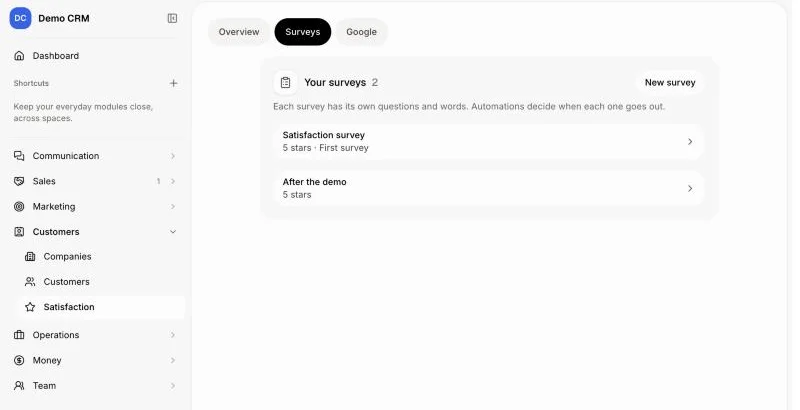
In your CRM, open Customers, then Satisfaction, then Surveys. Click New survey. It is saved right away with the look of your first survey, and its page opens.
Click: Customers › Satisfaction › Surveys › New survey
Step 2: Name it and pick its question
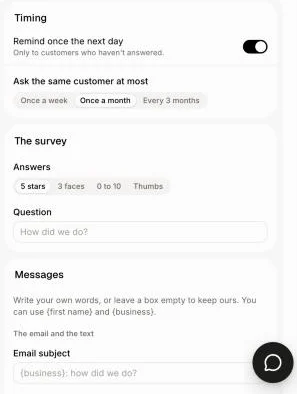
At the top of the page, type its name, like "After the demo". Under The survey, pick the Answers (5 stars, 3 faces, 0 to 10 or Thumbs) and write your Question. Under Messages, change the words of the email and the page if you want. Timing sets the reminder and how often one customer can be asked. Every change saves on its own.
Click: Satisfaction › Surveys › your survey
Step 3: Say when it goes out
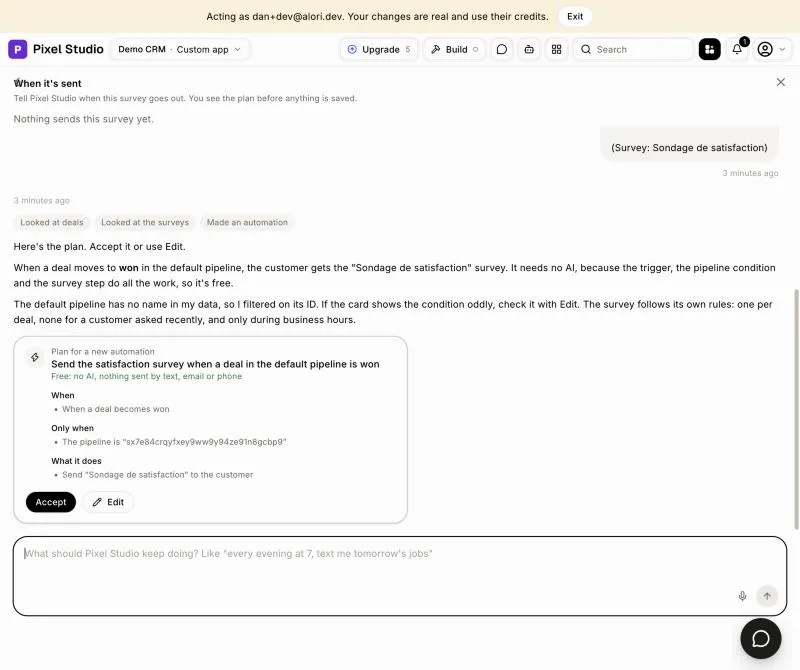
Under When it's sent, type when it should go out, or pick an example, like "When a deal moves to Won, send this survey" or "When a job is done, send this survey 2 hours later". Alori answers with a plan. Press Accept to save it, or Edit to change it. If more than one pipeline has that stage, Alori asks which one first. The automations that send the survey are listed right there.
Click: Satisfaction › Surveys › your survey › When it's sent
Good to know:
A customer gets one survey per job, deal or conversation, and at most once in the period you pick under Ask the same customer at most.
Surveys go out during the day only.
Overview counts every survey together. A survey's own page shows only its answers.
You can also ask Alori: "make a survey for after the demo and send it when a deal moves to Demo done".
If it doesn't work
Surveys go out once your app is published, so their links have an address. Publish your app.
Nothing sends this survey yet. Tell Alori when it goes out under When it's sent.
Only people whose role can build the app open this page. Ask the owner or an admin to set when the survey goes out.