How do I remove a conversation but keep its emails?
Open the conversation and click the crossed-out eye at the top. It leaves Conversations, and its emails stay on the customer and their company.
Some emails are not really conversations: a private intro, a personal note, a thread you only want on file. Open it in Conversations and click the crossed-out eye at the top. It leaves Conversations, and its emails stay on the customer's page and their company's page. Nothing is deleted.
Also called: hide a conversation, remove from inbox, private email, keep on file, archive, retirer des conversations, cacher une conversation, courriel privé
Step 1: Click the crossed-out eye
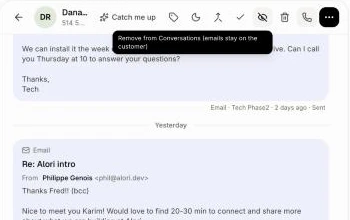
Click Conversations in the left menu and open the conversation. At the top, click the crossed-out eye, between the check mark and the trash can. Point at it first to see Remove from Conversations (emails stay on the customer).
Click: Conversations › the conversation › the crossed-out eye
Step 2: It leaves the list
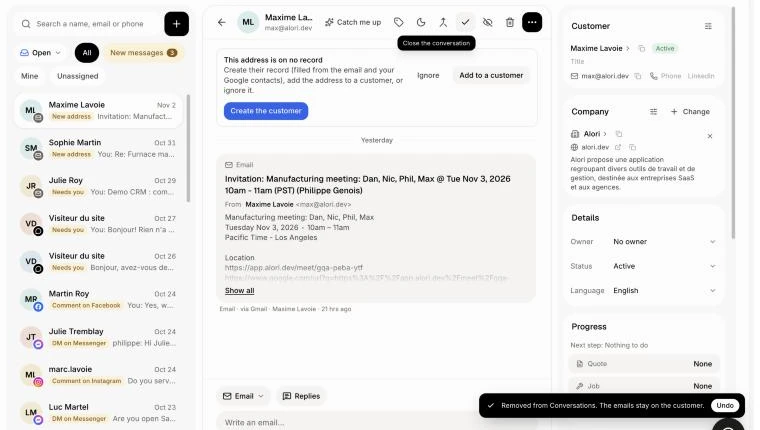
The conversation leaves the list and the next one opens. The message at the bottom says Removed from Conversations. The emails stay on the customer. Click Undo there if you clicked by mistake.
Step 3: Find the emails on the customer
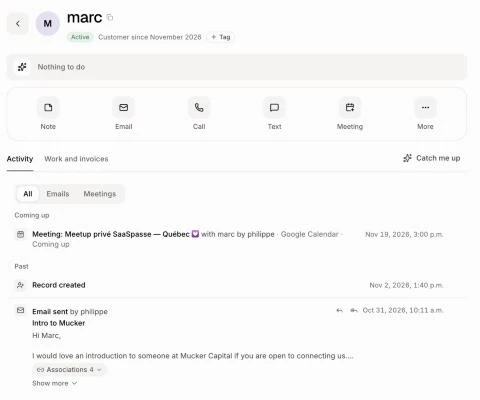
Open the customer, or their company. The emails are still there, under Activity, with their replies and attachments.
Click: Customers › the customer › Activity
Good to know
Nothing is deleted, in Alori or in Gmail. To delete the emails for good, use the trash can instead.
If the customer writes again, their new message starts a fresh conversation. The old emails don't come back into it.
Unlike Close, the conversation doesn't go to the Closed tab: it is out of Conversations.
You can ask Alori: "remove Dana's conversation from Conversations, keep the emails".
If it doesn't work
No crossed-out eye. Your role can only view conversations. Ask the owner.
The emails aren't on the customer. Check you opened the right customer: the emails stay on the customer the conversation was with.