How do I send emoji in a video meeting chat?
In the meeting's chat, click the smiley in the message box, or type a colon and a name like :tada. Point at a message to react to it.
In a video meeting, open the chat and click the smiley in the message box to pick an emoji, or type a colon and a name, like :tada. To react to someone's message, point at it and click the smiley with a plus.
Also called: emoji, emoticon, smiley, reaction, react to a message, meeting chat, émoji, émoticône, réaction, réagir à un message, clavardage de la réunion
Step 1: Open the emoji picker
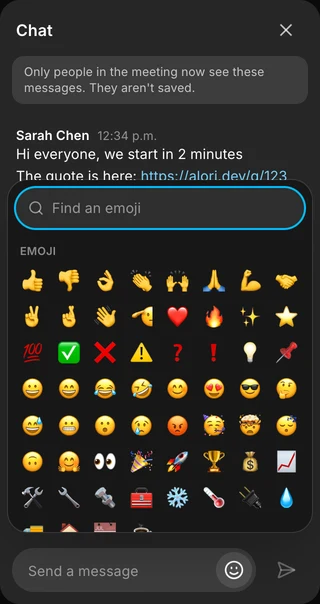
In the meeting, click the chat bubble at the bottom (Chat with everyone). In the message box, click the smiley (Emoji). You see the emoji you picked last under Recent, then the usual ones. Click one: it goes in your message where your cursor was.
Click: Chat with everyone › Emoji
Step 2: Search for an emoji
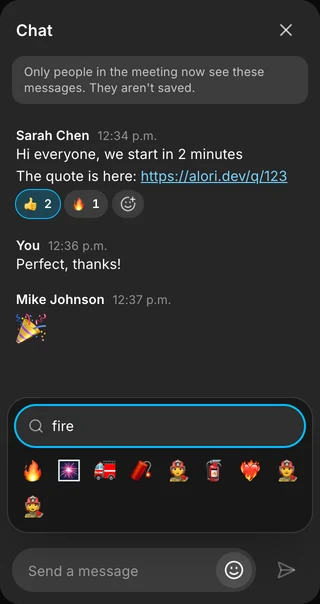
Type in Find an emoji to look through every emoji by its English name: "fire", "heart", "thumbs". Press Enter to pick the first one.
Step 3: Type a colon and a name
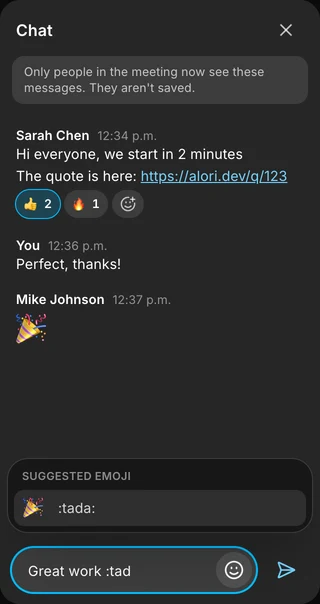
In the message box, type a colon and two letters or more, like :tad. Emoji that fit show above the box under Suggested emoji. Use the arrows, then Enter or Tab to pick one, or click it. Escape hides the list. A name written out in full, like :rocket:, is sent as 🚀.
Step 4: React to a message
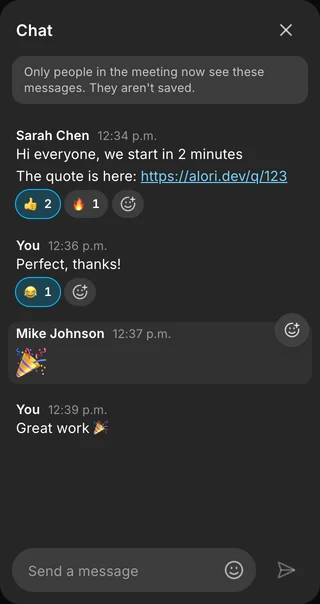
Point at a message and click the smiley with a plus (Add a reaction), then pick an emoji. It shows under the message with how many people chose it; yours has a blue outline. Click a reaction to add yours or take it back, and the + after them to add another. Point at a reaction to see who chose it. On a phone, the smiley sits at the end of each message.
Good to know
A message with only emoji (up to 10) shows big, so a quick 🎉 stands out.
Reactions don't count as new messages and make no sound.
Like the messages, reactions aren't saved: only the people in the meeting now see them, and someone who joins later doesn't see what came before.
A message can have up to 20 different reactions.
If it doesn't work
The message box and the smiley are greyed out. You're still joining the meeting. Wait a second.
":feu" finds nothing. Emoji names are in English: try :fire. Or search with a word in Find an emoji.
"No emoji found". Try another word, or a shorter one.