How do I take over a chat from Nora, or give it back?
Open the chat in Conversations and click Take over. Nora stops answering that visitor. Click Give back to Nora when you're done.
Open the chat in Conversations and click Take over. Nora, your support bot, stops answering that visitor, and you write to them yourself. When you're done, click Give back to Nora.
Also called: Nora, human handoff, take control, live agent, join the chat, prendre le relais, reprendre le chat, redonner au bot
Step 1: Open the chat
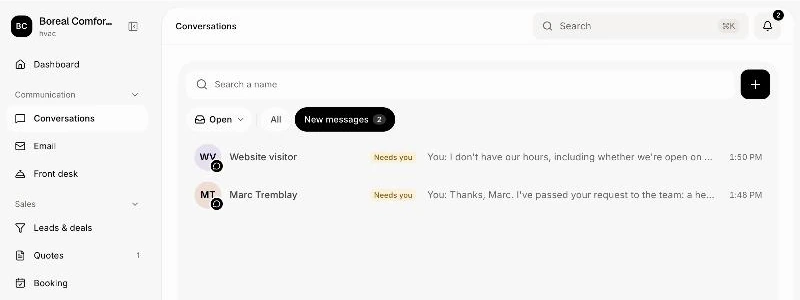
In your CRM, click Conversations. Website chats are tagged Website chat. The ones Nora passed to you are under New messages, with the reason.
Click: Conversations › New messages
Step 2: Take over
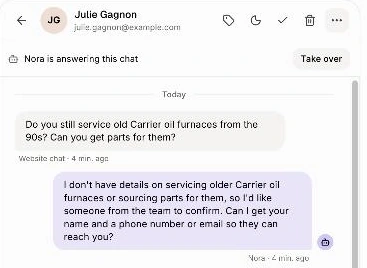
Above the messages, a bar says who answers, like "Nora is answering this chat". Click Take over. The bar now says "You answer this chat".
Click: the chat › Take over
Step 3: Write to the visitor
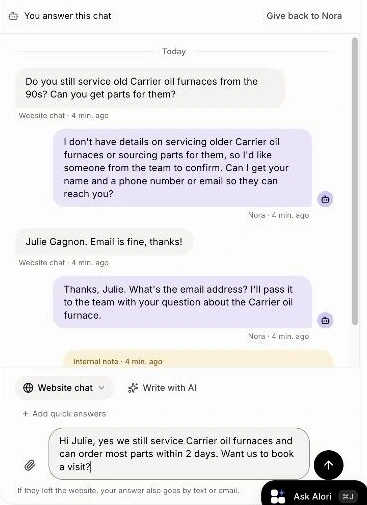
Type in Write to the visitor… and click Send, or press Shift + Enter. Enter alone starts a new line. If Nora suggested an answer, it's already in the box: "Nora suggested this answer." Change it or send it as it is. On the website now shows while the visitor is still there.
Click: Write to the visitor… › Send
Step 4: Give it back
Click Give back to Nora. If the visitor wrote last, Nora answers them now. To have Nora answer only their last message and keep the chat yourself, click Let Nora answer under it.
Click: the chat › Give back to Nora

From Discord
If your website chats go to a Discord channel (in Front desk), each chat has its own thread there.
Write in the thread to answer the visitor. The chat is yours and Nora stops answering. A ✅ shows on your message once it's sent.
/takeover takes the chat without writing anything.
/close closes the chat, like Close in Conversations. The visitor is asked to rate it.
Answer in the thread, not in the channel: a reply in the channel gets "Answer this chat in its thread" with a link to it.
Good to know
Answering is enough. When you answer a chat, Nora pauses in it on her own, even without Take over.
The visitor left? "If they left the website, your answer also goes by text or email."
Nora learns from you. When you answer a chat Nora passed on, she remembers the answer for next time ("Remembered for Nora", with Undo). See How do I teach Nora better answers?
Done? Click Close. The visitor can then rate the chat from 1 to 5 stars.
With Only you chosen in Front desk, there's no Give back to Nora: your team answers every chat.
If it doesn't work
No Take over button. Your role can't answer chats, or Nora isn't answering this one. Ask the owner about your role.
No Let Nora answer button. It shows only when the visitor wrote last.
"Nora is writing…" She's answering. Wait a moment.
"Only your team in Alori can do this." (Discord) Send the bot your email in a direct message to link your account, then try again.
"Use this in a website chat's thread." (Discord) Type /close or /takeover inside the chat's thread.