I forgot my password
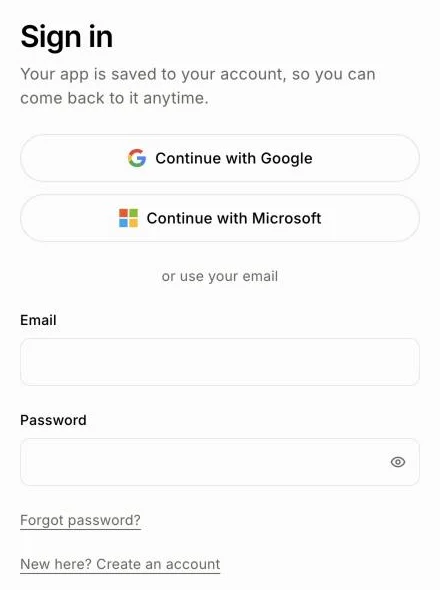
On the Sign in page, click Forgot password?, enter your email, then type the code we email you with a new password.
On the Alori Sign in page, click Forgot password? and enter your email. We email you a code: type it with your new password, and you're signed in.
Also called: reset password, lost password, can't sign in, mot de passe oublié, réinitialiser le mot de passe
Step 1: Click Forgot password?
On the Alori website, click Sign in, then Forgot password? under the password box.
Click: Sign in › Forgot password?
Step 2: Ask for a code
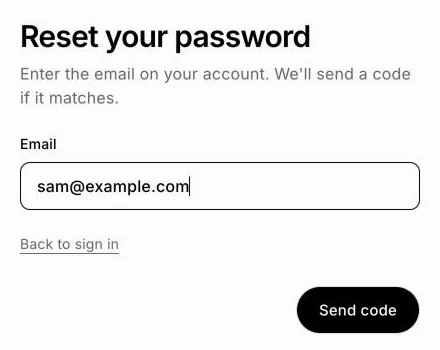
Under Reset your password, enter the email on your account and click Send code. If that email has an account, we send it a code.
Click: enter your email › Send code
Step 3: Choose a new password
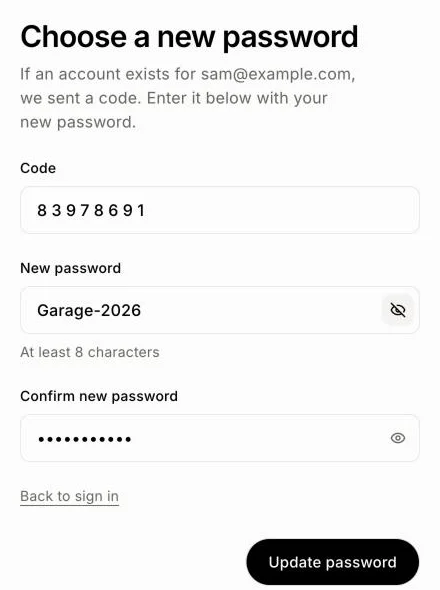
Under Choose a new password, enter the 8-digit Code from the email: it's in the email's subject too, and Gmail and iPhone Mail often show a button to copy it. Pasting it works, spaces and all. Then type your New password, and the same password again in Confirm new password. Click the eye in a password box to see what you typed; click it again to hide it. Click Update password. You're signed in.
Click: enter the code and your new password › Update password
Signed up with Google or Microsoft?
Then you have no Alori password. On the Sign in page, click Continue with Google or Continue with Microsoft instead.
Your team app uses the same password
Your team app has no password of its own: you sign in to it with your Alori account. Reset your Alori password as above, and the new one works everywhere, for you and for each teammate.
Already in your team app? Click your picture at the top right, then My account. Under Password, click Change my password: your Alori profile opens, where you change it.
If it doesn't work
No email? Check your spam folder, and make sure you typed the email you signed up with.
Update password stays grey? Every box needs filling: the code has 8 digits and each password at least 8 characters.
"That code is wrong or expired. Request a new one." Go back and send a new code. A code works for 15 minutes.
"Those new passwords don't match." Click the eye in each box to compare them, then type the same new password in both.
"We couldn't reset that password. Try again in a moment." Wait a moment and try again.