What can each Team role do?
Employee, Supervisor, Accountant or HR decides what someone sees in Employees. Pick it when you invite them or on their file; the pencil changes one right.
Someone's Team role decides what they see in Employees, apart from their CRM role. There are four: Employee, Supervisor, Accountant and HR. You pick it when you invite them, and you can change it any time on their employee file.
Also called: HR permissions, employee access, supervisor, manager, accountant, payroll access, rôle d'équipe, superviseur, comptable, RH, accès aux employés
The four roles
Employee: their own file, the team's time off and birthdays, and the org chart. Nobody else's file.
Supervisor: all of Employees except pay and file notes. Approves time off for the people under them on the org chart.
Accountant: everyone's pay and hours. No file notes, and changes nothing.
HR: everything, file notes and pay included. Approves everyone's time off.
Admins always have everything.
Step 1: Pick it when you invite them
In Users, type their email and pick their CRM role. Tick Part of the team, then pick what they see in Employees. They get an employee file right away, and their login is linked to it when they accept.
Click: Users › Part of the team › a role › Invite
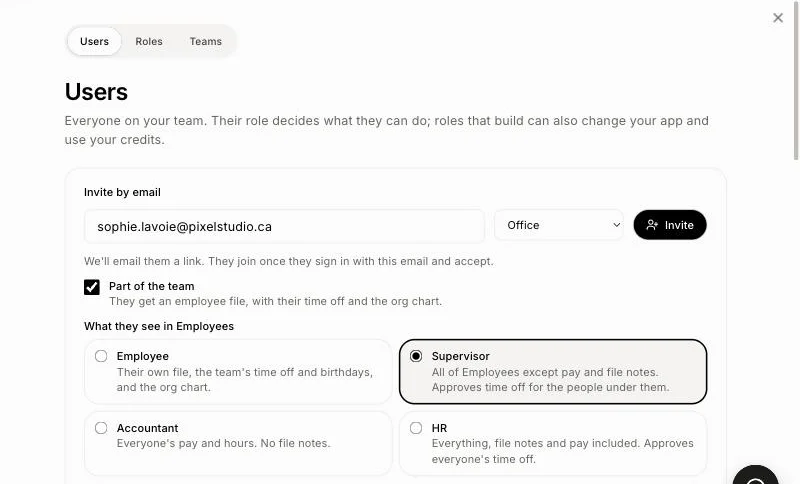
You can also pick it in Employees › Add an employee, under In the team.
Step 2: Change it on their file
Go to Employees › List and open the person. Under Access to Employees, click another role. It saves at once. When no role is picked yet, their CRM role still decides, as before.
Click: Employees › List › the person › Access to Employees › a role
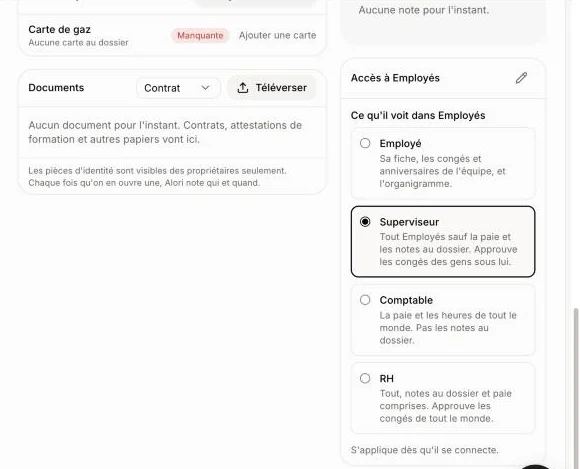
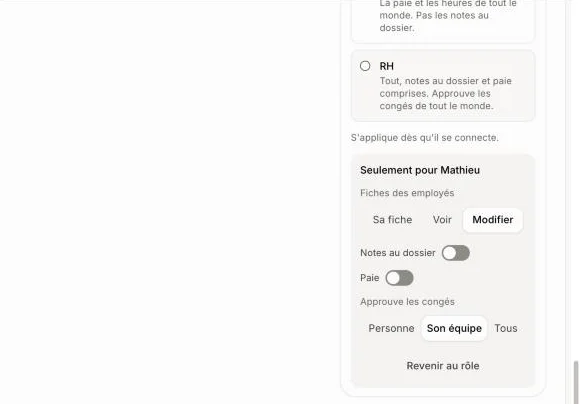
Step 3: Change one right for this person only
Click the pencil beside Access to Employees (Change for this person). Change Employee files, File notes, Pay or Approves time off: only this person changes, and Changed for this person shows on their file. Click Back to the role to undo it.
Click: the pencil › a switch
Good to know
Only admins and HR give Team roles. Nobody gives a right they don't have.
Changing the role puts back the role's rights for that person.
A role works once they sign in. Until then, Takes effect once they sign in. shows under it.
You can ask Ask Alori: "Make Mathieu a supervisor" or "Let Léa see pay."
If it doesn't work
There is no Access to Employees on the file. Only admins and HR see it. Ask one of them.
They still see pay or notes. Open their file and check for Changed for this person: click the pencil, then Back to the role.
A supervisor can't approve someone's time off. That person isn't under them on the org chart. Fix who they report to in How do I see who reports to whom?