Who answers the chat: Nora, my team, or both?
You choose in Front desk. Nora answers first, you first with Nora as backup after 2 minutes, or only you with Nora suggesting answers.
You choose in Front desk › Settings, under Who answers. You choose for the website chat and for your support email apart. Nora, your support bot, can answer first, back you up when nobody replies in 2 minutes, or stay out of the chat and only suggest answers.
Also called: Nora, chat mode, email mode, support email, bot or human, auto-reply, live agent, chat email, new chat email, stop chat emails, qui répond, mode du chat, réponse automatique, courriel de chat
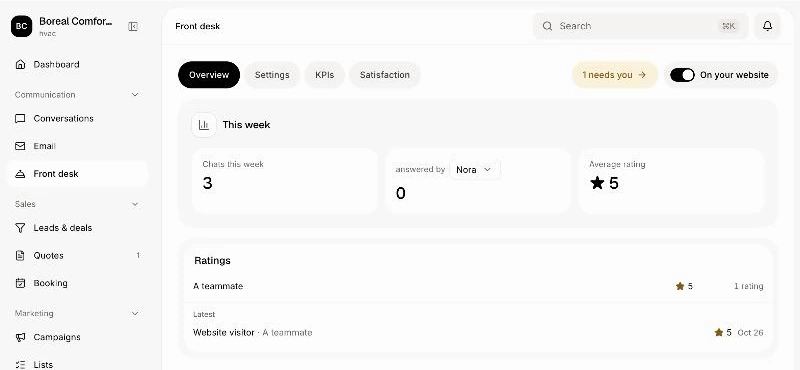
Step 1: Open Front desk
In your CRM, click Front desk in the menu.
Click: Front desk › Settings
Step 2: Pick who answers
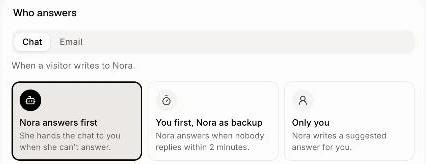
Under Who answers, pick Chat for your website chat or Email for emails to your support email, then pick one. Each keeps its own choice, and it saves right away. Until you change Email, emails follow the same choice as the chat. Once your business gets Messenger or Instagram messages, a Messenger choice shows too, for those messages.
Nora answers first: "She hands the chat to you when she can't answer." This is the default.
You first, Nora as backup: "Nora answers when nobody replies within 2 minutes."
Only you: "Nora writes a suggested answer for you."
Click: Front desk › Settings › Who answers
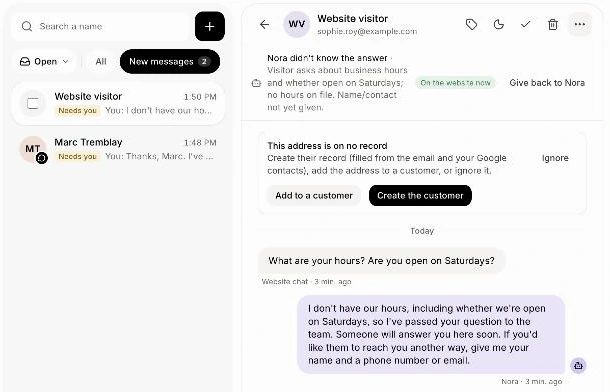
When Nora passes a chat to you
The chat goes under New messages in Conversations, with the reason, like Nora didn't know the answer, They asked for a person, Urgent, Wants a quote or Unhappy customer. The bell rings for whoever follows that customer (or the whole team), and the owner gets an email with the reason, what the visitor asked and an Open the chat button. Nora's suggested answer is already in the reply box.
Stop the emails
Under Who answers, turn off Email me when a chat needs me. Chats still come under New messages in Conversations, and the bell still rings.
Click: Front desk › Settings › Who answers › Email me when a chat needs me
Good to know
Your answer pauses Nora in that chat. Once someone on the team answers, Nora stops answering that visitor until someone gives the chat back. See How do I take over a chat from Nora, or give it back?
Each chat says who answers it: "Nora is answering this chat", "Nora answers if nobody replies within 2 minutes" or "You answer this chat".
What Nora answers from: your price list, services and hours, your published Help center articles, and the parts of Company memory a customer may hear. See How do I teach Nora better answers?
Your support email only in CC? Nora only writes a suggested answer for you. To let her answer those emails too, pick Email and turn on Nora answers when she's only CC'd.
She's honest. If a visitor asks, Nora says she's an AI assistant.
Visitors can ask for a person. When a visitor picks Talk to our team in the bubble, the chat comes straight to you under New messages, whatever you chose here. With Only you, the bubble doesn't offer Ask our assistant, and Ask Nora is greyed under What visitors see.
If it doesn't work
The choices are grey. Your role can't change them. Ask the owner.
The chat shows "Nora couldn't answer". Alori couldn't be reached, so the chat came to you. Answer it in Conversations.