Who can see my meetings?
Your meetings are private to you. Click Only you on a meeting to share it with the whole team or with chosen teammates.
Only you see your meetings (and your team's admins): the video meetings you hold, the in-person meetings you record and the ones you import, with their recording, transcript and summary. Teammates you invited see it too: in the meeting, on its Alori event or on its Google Calendar event. To share a meeting, click Only you on it and pick the whole team or just some teammates.
Also called: private meeting, share a recording, meeting privacy, permissions, visibility, réunion privée, partager un enregistrement, confidentialité des réunions
Step 1: Open the meeting
Open the meeting from Meetings or your Schedule. Under its title, Only you means nobody else on the team can see it.
Click: Meetings › your meeting

Step 2: Choose who can see it
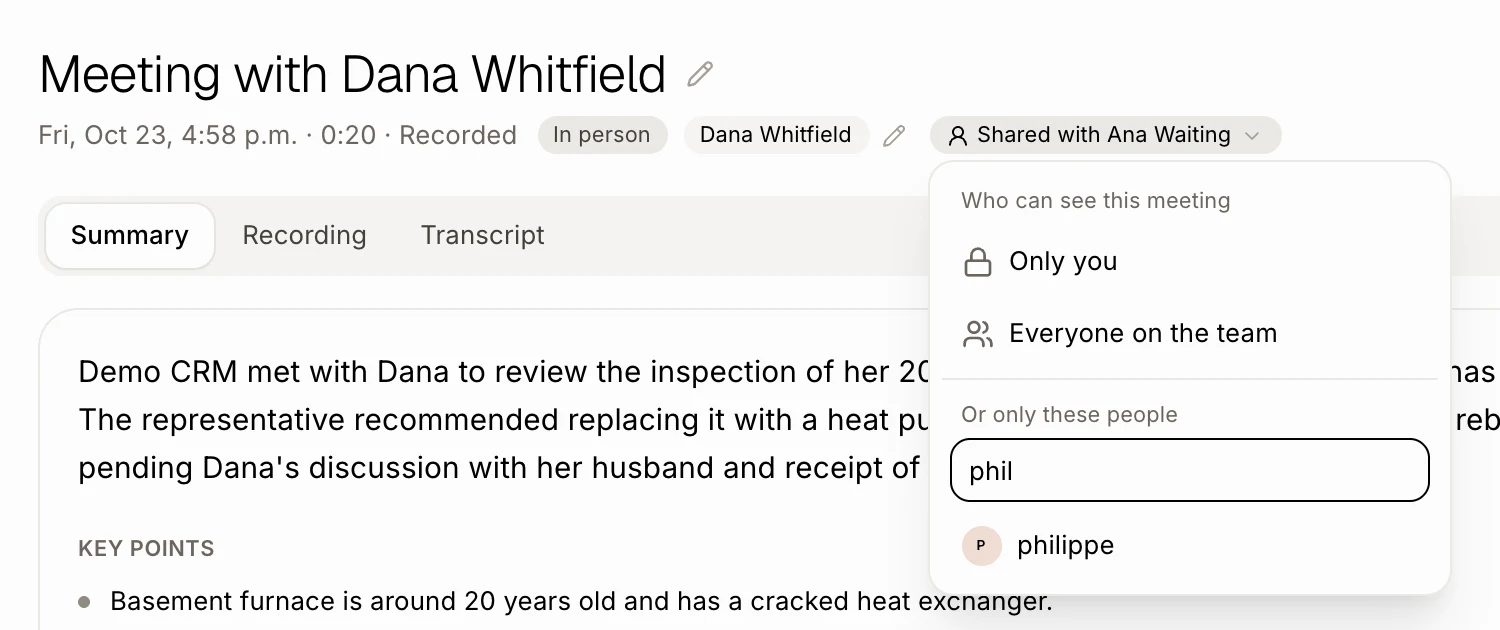
Click Only you. A small menu opens:
Everyone on the team: the whole team sees the meeting, its recording, transcript and summary, on the Meetings page and on the customer's record.
Or only these people: type a name in Type a name and press Enter, or click a teammate, to share it with them. Click them again to take them off. You can pick as many as you want. The chip then shows who, like Shared with Ana.
Only you: makes it private again.
It saves as soon as you click. Each teammate you add gets a notification on their bell, and clicking it opens the meeting.
Click: Only you › Everyone on the team, or a teammate's name
You can also ask Alori: "Share my meeting with Dana with Ana" or "Share it with the team."
Step 3: Share it outside the team
To send a meeting to a customer or anyone without an account, click ⋯ › Copy the public link on a meeting you held. The link opens a page with the summary, the recording and the transcript, never the team's notes. Click ⋯ › Turn the public link off to stop it working.
Click: ⋯ › Copy the public link
Good to know
Admins see every meeting on the team, under Team on the Meetings page, like on Fathom. Their own list, My meetings, stays theirs. See How do I see my whole team's meetings?.
Only the person who held the meeting can change who sees it. A teammate who can see someone else's meeting sees Shared with the team or Shared with you.
A meeting someone booked through your booking page belongs to the host of that booking.
Ask Alori and the bot only find meetings you can see.
Any teammate can join the call itself, like on Google Meet: a teammate you didn't invite who opens the link goes straight into the call, without its recording, transcript or summary. Once it's over, they see Only the people invited see this meeting's notes and recording. Ask Dana to share it with you.
If it doesn't work
A teammate can't find a meeting: it's still private, or not shared with them. The person who held it clicks the chip under the title and adds them.
A teammate invited on Google Calendar can't see it: they were invited at an email that isn't their Alori sign-in or a calendar they connected in Alori. Share the meeting with them, or invite them at their Alori email.
Nobody by that name: check the spelling, or the person isn't on your team yet: add them on the Users page.
There's no menu when you click: you didn't hold this meeting, so only the person who did can change who sees it.