How do I link an email to a deal, a company or a person?
Under each email in a History, open Associations to see its person, company and deals, remove one, or add one with a single search.
Under every email in a customer's, company's or deal's History, click Associations to see what the email is linked to: the person, the company and its deals. Remove one with its ×, or click Add and search for a customer, a company or a deal. The email shows in the history of each one it's linked to.
Also called: associations, associate an email, link an email, attach an email to a deal, file an email, move an email to another customer, remove an email from a deal or company, lier un courriel, associer un courriel à un deal
Step 1: Open the email's associations
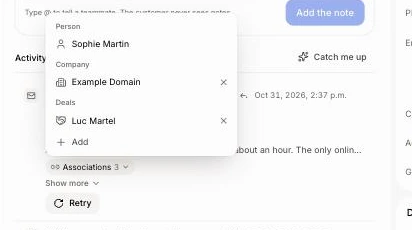
Open the customer, company or deal the email is on. Under the email, click Associations (the number says how many). The list shows the Person it was with, its Company and its Deals, the deal you're on included. Click a name to open it.
Click: the record › Activity › Associations
Step 2: Add one
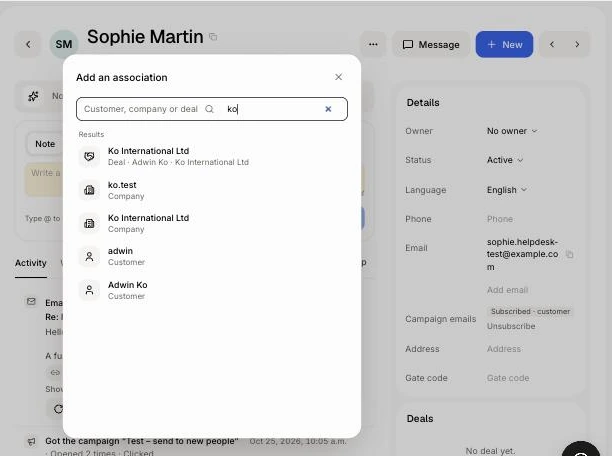
At the bottom of Associations, click Add. Type part of a customer's, company's or deal's name (or a person's email or phone). Each result says what it is. Click one: it saves right away and says what changed, with Undo if you picked the wrong one.
A Deal links the email to that deal.
A Company becomes the email's company.
A Customer moves the email to that person: it leaves the first person's record for theirs.
Click: Associations › Add › type › the result
Step 3: Remove one
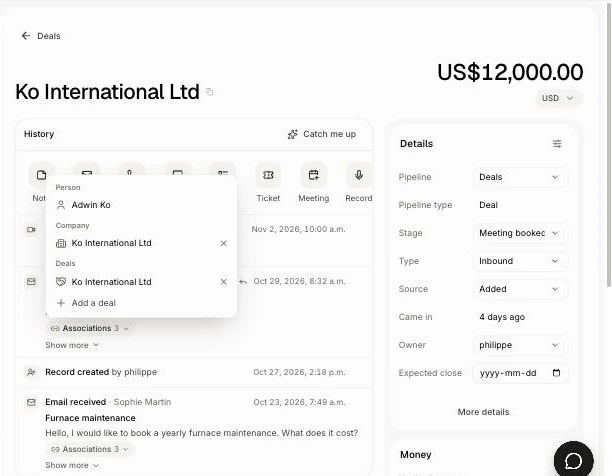
Click the × beside a company or a deal (Unlink from it). The email leaves that company's or deal's history, and Undo puts it back.
Click: Associations › ×
Good to know
An email has one person and one company. Picking another one replaces it.
You link one deal yourself. Adding another deal moves that link to it. The person's own deals show too, since the email is about them; removing one takes the email off that deal only, the person stays on it.
Ask Alori can do it too: "link the last email from Marc to the Mucker deal".
If it doesn't work
No × or Add in Associations. Your role can't change deals. Ask an admin to give your role edit on Leads & deals.
The customer, company or deal isn't in the results. The search shows the newest ones. Check the spelling, or search by its person or company.
One disappeared from Associations. Someone removed it, or it was deleted. Add it again.