How do I mark a conversation as spam or block someone?
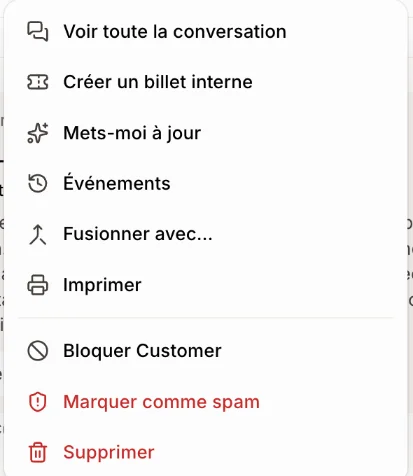
In a conversation's ⋯ menu, click Mark as spam or Block. Their messages go to Spam, and nothing automatic writes to them again.
Written by Nicolas Thibault
Open the conversation, click ⋯, then Mark as spam. Its messages leave your inbox for the Spam list, and the sender is blocked. To only stop someone from reaching you, click Block instead: their past messages stay where they are.
Also called: spam, junk, block sender, suspend user, blocked senders, indésirable, bloquer, expéditeur bloqué, suspendre
Step 1: Mark a conversation as spam
In Conversations, open the conversation. Click ⋯, then Mark as spam. In the Tickets layout, it marks only the ticket you have open.
Click: Conversations › the conversation › ⋯ › Mark as spam
Made a mistake? Click Undo on the message that shows at the bottom.
Step 2: Find it in Spam
Open the status menu at the top of the list (All by default) and pick Spam. Each row is someone's spam. Click Not spam to put it back in Conversations and unblock them. Spam is deleted for good 30 days after it was marked.

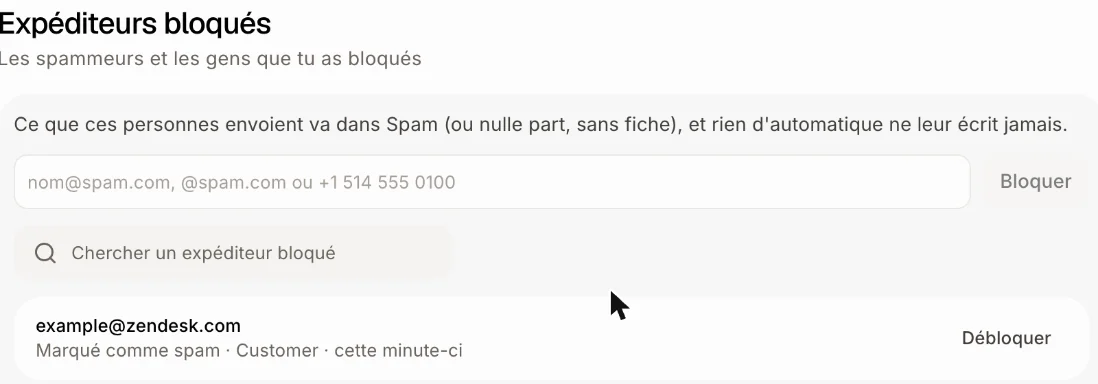
Step 3: See who is blocked
Go to Settings › Blocked senders. You see every blocked address, domain and number, why, and when. Click Unblock to let one back in. To block a whole company's email, type its domain, like @spam.com, and click Block.
Good to know
What a blocked person sends goes straight to Spam: email, website chat, Messenger, Instagram and comments. Their calls hear that nobody is available, and their texts don't arrive.
Nothing automatic writes to them: not Nora, not automations, surveys, reminders, campaigns or sequences. You can still write to them yourself.
Their history stays. Blocking someone keeps their older messages, tickets and notes where they are.
An unknown sender with nothing else on their record is deleted right away when you mark them as spam.
Coming from Zendesk? People you suspended in Zendesk arrive blocked.
Trying Alori beside Zendesk? While Zendesk still answers your customers, Mark as spam and Block don't show: do it in Zendesk until you go live.
If it doesn't work
No Mark as spam in the menu. It needs the right to delete conversations. Ask an admin.
"A whole free mail domain (gmail.com…) can't be blocked." Block the person's address instead.
Related
Did this answer your question?