How do I work in cycles?
In Settings › Tickets, pick a cycle length for the team, from 1 to 8 weeks, and a break between cycles if you want one. Then plan each cycle's tickets in Tickets › Cycle.
Cycles are blocks of a few weeks, like sprints: the team picks what it will do in the cycle, and what isn't done moves to the next one by itself.
Also called: sprint, iteration, cooldown, break between sprints, cycle, sprint, pause entre les cycles
Step 1: Pick the cycle length and the break
Click Settings › Tickets. For the team, pick Cycles: 1 wk to 8 wk. Under Break between cycles, pick 1 wk or 2 wk to rest, plan and fix what piled up between two cycles, or None.
Click: Settings › Tickets › Cycles

Step 2: Plan and follow the cycle
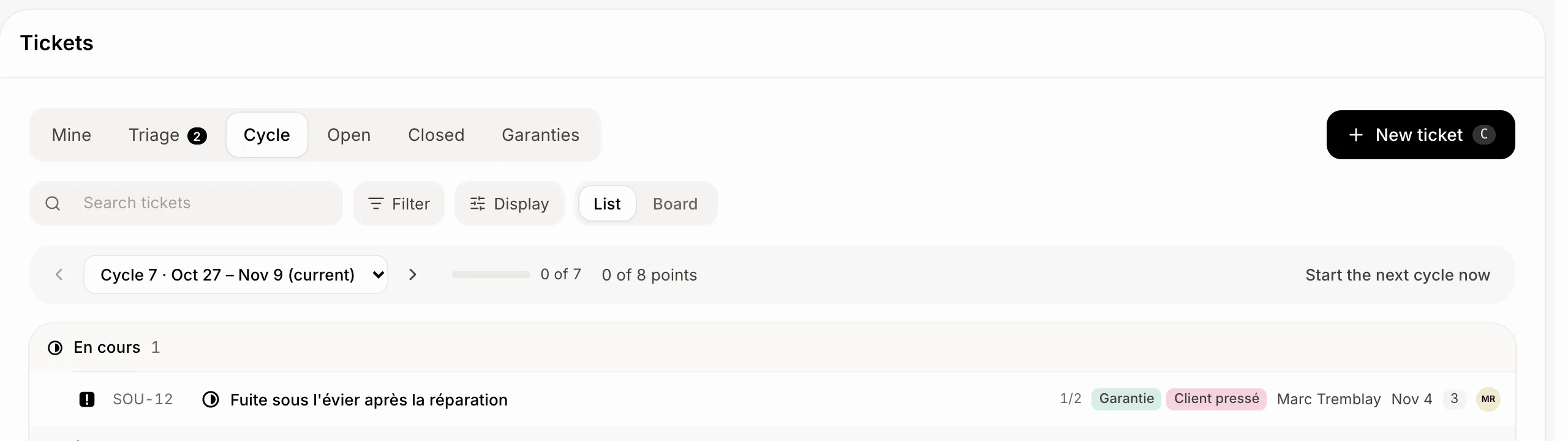
Open Tickets › Cycle. The bar shows how many tickets are done, and their points. The arrows go to the cycle before or after; put a ticket in a cycle from its Cycle.
Click: Tickets › Cycle
Step 3: Start the next cycle early
Done before the end? Click Start the next cycle now. The cycle running ends yesterday, the next one starts today, and the open tickets move into it.
Good to know
During a break, Tickets › Cycle says when the next cycle starts. Nothing goes in a break: open tickets wait in the next cycle.
Changing the length or the break starts the cycles over from today.
Start the next cycle now is for people who can change the Tickets settings.
You can ask Ask Sam: "make the Support team's cycles 3 weeks with a 1 week break" or "start the next cycle now".