How do I send support emails from my own address?
In Front desk › Setup, type your support address, forward it to Alori and add the DNS records. Then support emails go out from it.
Written by Nicolas Thibault
Your customers can get support emails from your own address, like info@yourcompany.com, instead of your Alori address. In Front desk › Setup, type the address, forward it to Alori, and add a few DNS records where your domain is managed. Until both steps are done, support emails keep going out from your Alori address, so nothing breaks in the meantime.
Also called: support address, sender address, from address, custom domain, send as, DNS, DKIM, adresse de support, adresse d'envoi, domaine personnalisé, envoyer comme
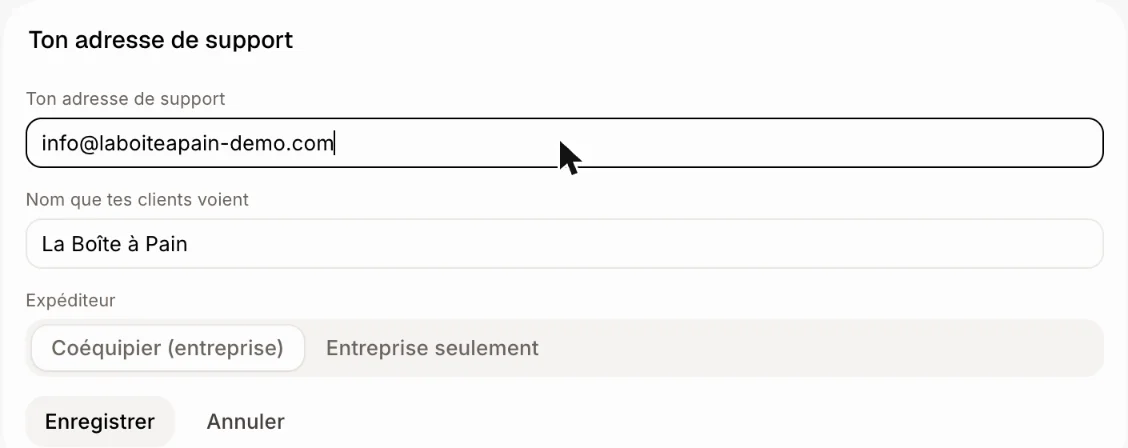
Step 1: Type your support address
In your CRM, click Front desk, then Setup. On Your support address, click Set up. Type the address your customers write to, and the Name customers see, like "FightCamp Support". Click Save.
Click: Front desk › Setup › Your support address › Set up
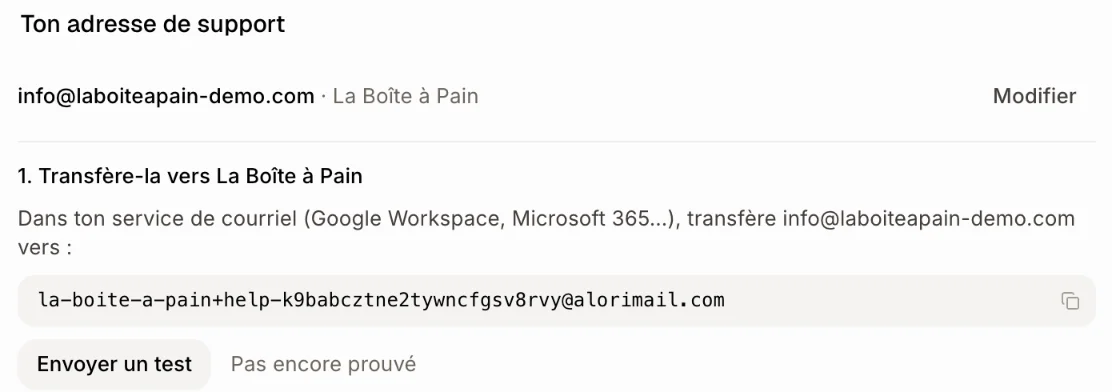
Step 2: Forward it to Alori
Under 1. Forward it to Alori, copy the address Alori shows. In your email provider (Google Workspace, Microsoft 365…), forward your support address to it. Then click Send a test. Once the test comes back through your forward, the step shows Forwarding works.
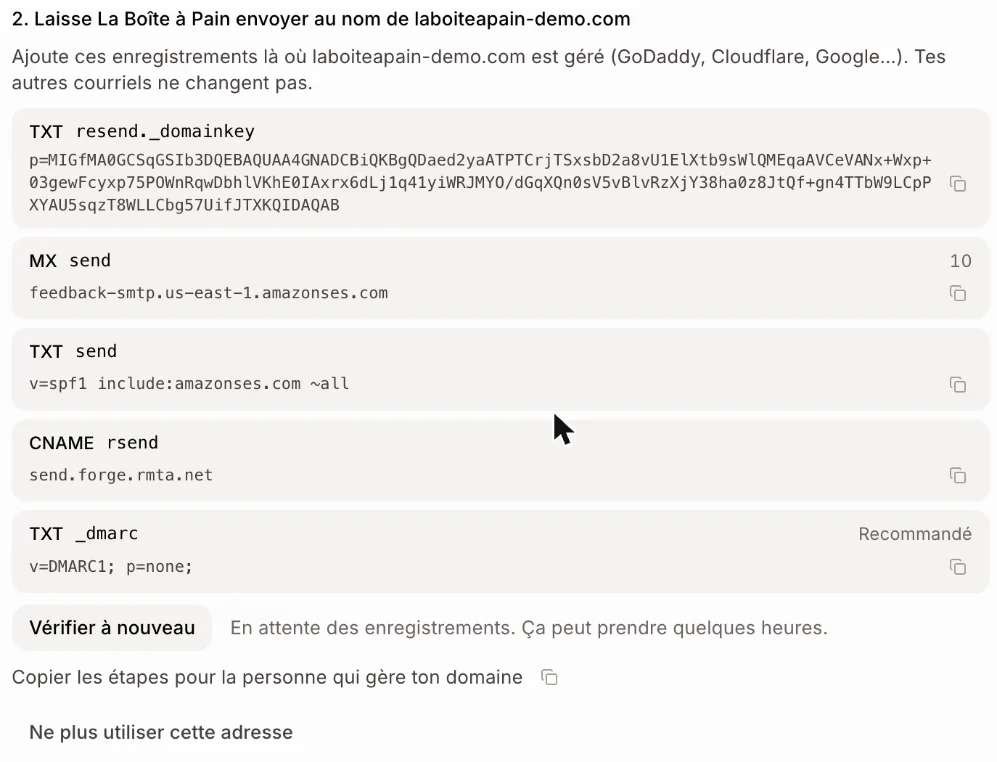
Step 3: Let Alori send as your domain
Under 2. Let Alori send as, Alori lists the DNS records to add, plus a recommended DMARC one. Add each one where your domain is managed (GoDaddy, Cloudflare, Google…), with the copy button beside each value. Your other email isn't touched. Not the one who runs your domain? Click Copy the steps for whoever runs your domain and send them. Then click Check again. Records can take a few hours to show up.
When both steps are done, the card says Customers get support emails from your address.
Who the email comes from
Once it's ready, pick Answers leave from:
The support address: every answer comes from it, with the teammate's name if Sender is Teammate (business).
Each teammate's address: each answer comes from the teammate's own address on your domain, like omar@yourcompany.com. The customer's reply still lands on the ticket.
Good to know
Nothing to do for automatic emails. Nora's answers, reminders and surveys go out from your support address too. Nora never answers an out-of-office or another help desk's automatic email.
Coming from Zendesk? Alori fills in your Zendesk support address for you. Do these steps the day you leave Zendesk: until then, Zendesk answers your customers.
Held as spam. Emails to your support address that look unsafe wait on the card. Click Let it through for a real one, or Delete.
Something breaks? If a record or the forward stops working, support emails go back to your Alori address right away, and you get an email saying what to fix.
If it doesn't work
"Type a full email address." Type the whole address, like info@yourcompany.com.
"Sending as … needs an address on your own domain." A Gmail or Outlook.com address can't be used to send. Use an address on your own domain.
"Another Alori account already uses this domain." Stop using it in the other account first, then save again.
"Your campaigns send from this domain." Move your campaigns to a subdomain like mail.yourcompany.com first.
"These records don't match yet." Check each value against the card, then click Check again.
"A record is missing or changed." Someone changed your DNS. Add the record again, then click Check again.
Related
Did this answer your question?